

last update 8/14/26 by Cynthia
There is an intermittent bug when posting a photo!
This bug is mostly fixed by Rev 3.1.1. Please update to this rev if you haven’t already done so.
Once in awhile the app posts the text but without the photo.
This happens if the user switches away from the submit screen before the submit has completed. The app will erroneously report success, but only the text was uploaded. So, wait till the submit button finishes and always check the pet profile to make sure the photo is there. If not email customercare@adoptmeapp.org with the pet’s hashtag or AID and repost this time waiting longer for the submit to finish.
In order to continue operating, AdoptMeApp needs 100 users like you to each make a $5/month recurring donation. Please be one of those donors!
Donate Here
For immediate help, please email
customercare@adoptmeapp.org
Instagram and TikTok Reels Can be Added to the Diary!
Facebook too but more complicated
under certain conditions, click links above
Congratulations AdoptMeApp Appsters!
403K Postings as of 7/30/26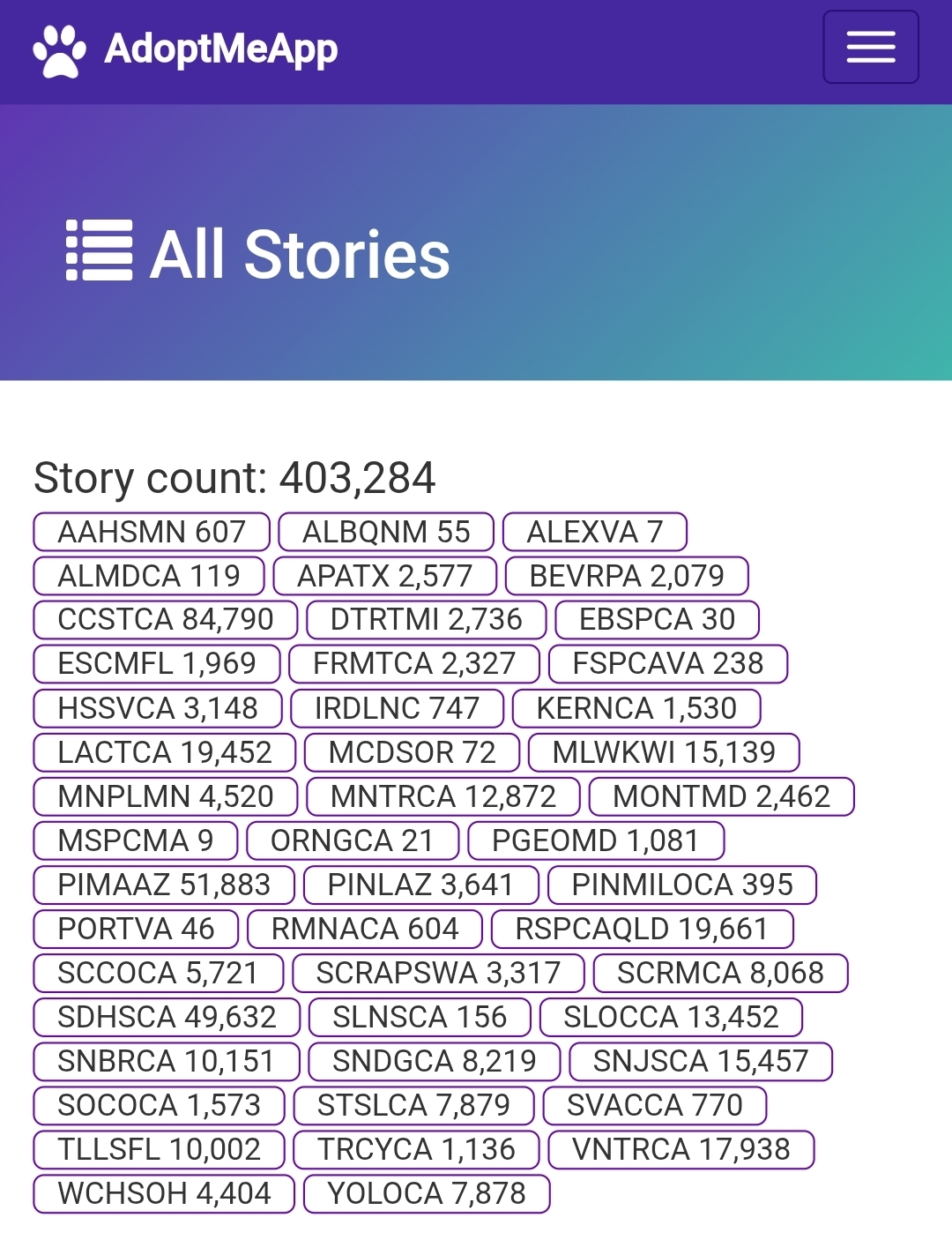
This page has some Tips and Tricks, answers questions, tells you how to get help, links to each shelter’s diary and much more.
Key items for AdoptMeApp Users/Shelters
- How to post a video on AdoptMeApp
- Oh no, I made a mistake! What do I do? (also, I found a mistake)
- Flyers are here
- How to see all of the AdoptMeApp posts for YOUR shelter, and who posted what
- Find out the status of any pet that is in the AdoptMeApp database
- Reset password This Link is also in the home screen
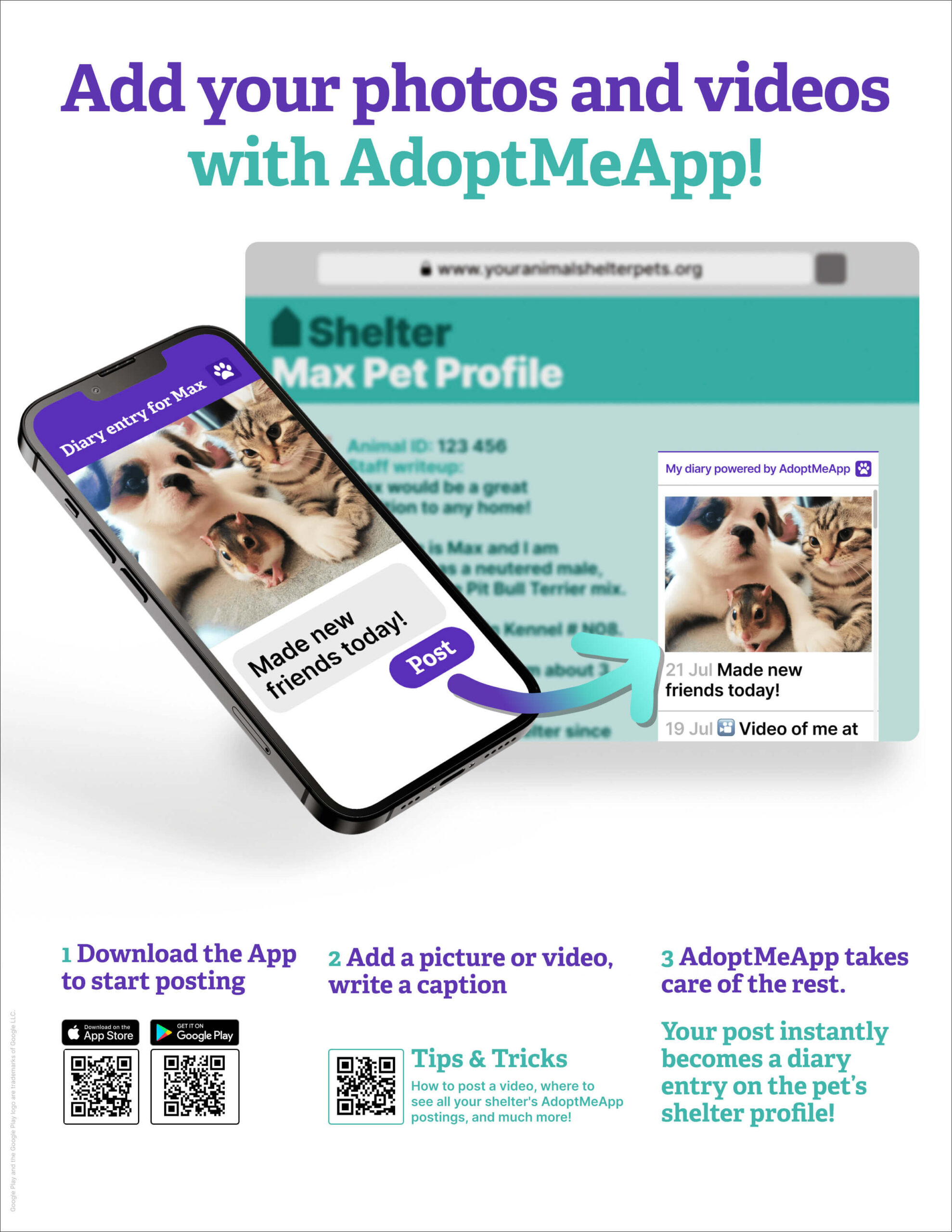
Main Flyer
Flyer repository: JPG & PDF
How to post a video flyer
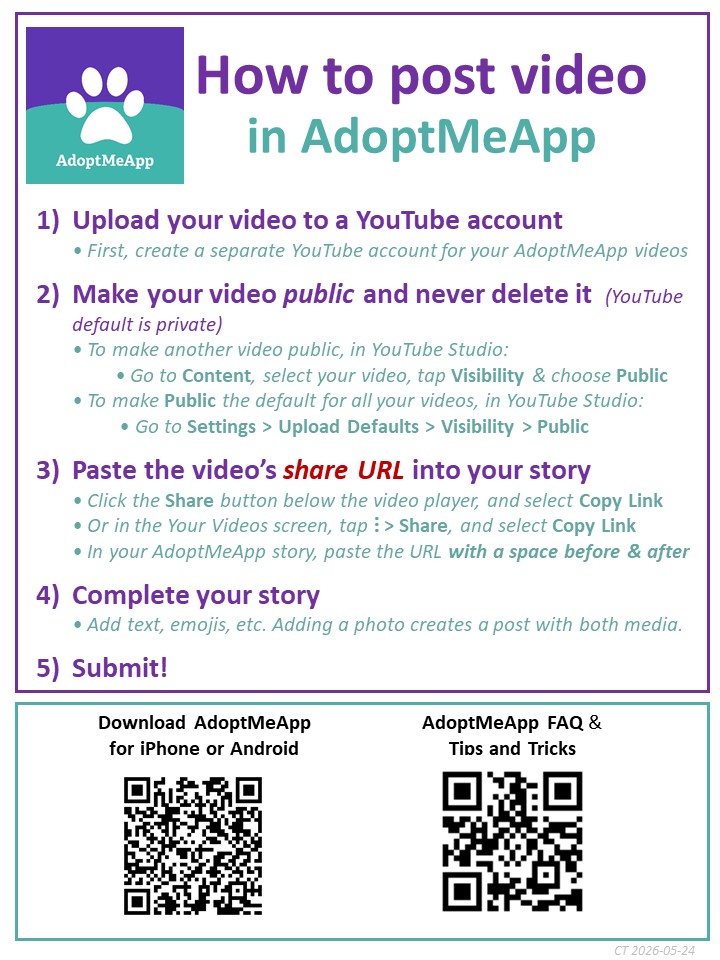
IMPORTANT! AdoptMeApp only recognizes the YouTube URL. No other URLs are recognized. There is a workaround. See the URL section below.
Lots more! – click this link to the list of everything else
Oh no, I made a mistake! What do I do?
(also, I found a mistake)
First of all, don’t panic, There is no mistake that is not fixable.
By far the most common mistake is posting for the wrong pet. This is an easy mistake to make – eventually you will make it (maybe multiple times) so do not fret.
-
- Re-post for the correct pet (you do not have to wait for the mistake to be corrected)
- Send an email to customercare@adoptmeapp.org with the subject line something like “I posted for the wrong pet”.
- Include info about which wrong pet – shelter name or ID, animal name or hashtag or ID. Ideally take a screenshot of the post you want deleted.
- We will delete that incorrect post.
- That’s it!
What if you see that someone else posted for the wrong pet? Follow steps 2-5 above.
For all other mistakes, just send us an email at customercare@adoptmeapp.org
But do not worry about minor mistakes e.g. spelling errors. Unless your spelling error results in a naughty word or the opposite meaning, it’s fine.
Uh oh, I forgot my password
How to see all of the AdoptMeApp posts for YOUR shelter, and who posted what
View all of my shelter’s posts
How to find out who posted what
- Each shelter has a diary widget for just their posts.
- There is also a widget for ALL of the shelters’ posts.
- These widgets can be embedded into any webpage – all of them are here on this blog – look below or on the left in the index. It’s very easy to embed these diary widgets in a blog or on a website. Ask us how to do this.
- There is also a real-time list of who posted what for all shelters, and for each shelter (aka User Activity)
AdoptMeApp All Shelters’ Widget
This diary widget has ALL of the AdoptMeApp posts from ALL of the partner shelters.
All User Postings List
This webpage has the user info on who posted what for all shelters. Info includes username, caption, link to photo, *pet hashtag, *link to pet profile.
*See below for explanations.
But you are probably most interested in this information for just YOUR shelter! See below.
Shelter Specific
— Alameda Animal Shelter – Friends of the Alameda Animal Shelter FAAS (CA)
Widget | User Activity
— City of Albuquerque (NM)
Widget | User Activity
— Animal Welfare League of Alexandria (VA)
Widget | User Activity
— Austin Pets Alive (TX)
Widget | User Activity
— Beaver County Humane Society (PA)
Widget | User Activity
— Contra Costa County Animal Services Division (CA)
Widget | User Activity
— Detroit Animal Care and Control City (MI)
Widget | User Activity
— Escambia County Animal Shelter in Pensacola (FL)
Widget | User Activity
— Front Street Animal Shelter City of Sacramento (CA)
Widget | User Activity
— Iredell County Animal Services (NC)
Widget | User Activity
— Kern County Animal Services (CA)
Widget | User Activity
— (City of) Los Angeles Animal Services (CA)
Widget | User Activity
— Massachusetts SPCA (MA)
Widget | User Activity
— Milwaukee Area Domestic Animal Control [MADAC] (WI)
Widget | User Activity
— Minneapolis Animal Care & Control (MN)
Widget | User Activity
— Hitchcock Road was Monterey County Animal Services (CA)
Widget | User Activity
— Montgomery County Animal Services & Adoption Center (MD)
Widget | User Activity
— Pima (County) Animal Care Center (AZ)
Widget | User Activity
— Pinal County Animal Care & Control (AZ)
Widget | User Activity
Widget | User Activity
— Prince George’s County Animal Services and Adoption Facility (MD)
Widget | User Activity
— City of Salinas Animal Services (CA)
(merged with Monterey County/Hitchcock Road)
Widget | User Activity
— (County of) San Diego Animal Services (CA)
Widget | User Activity
— San Diego Humane Society (CA)
Widget | User Activity
— San Luis Obispo County Animal Services (CA)
Widget | User Activity
— County of Santa Clara Animal Services (CA)
Widget | User Activity
— San Jose Animal Care Center (CA)
Widget | User Activity
— Santa Barbara County Animal Services (CA)
Widget| User Activity
— Silicon Valley Animal Control Authority (CA)
Widget | User Activity
— Solano County Animal Services (CA)
Widget | User Activity
— Spokane County Regional Animal Protection Service (WA)
Widget | User Activity
— Stanislaus Animal Services Agency (CA)
Widget | User Activity
— Tallahassee Animal Services (FL)
Widget | User Activity
— (City of) Tracy Animal Services (CA)
Widget | User Activity
— Tri-City Animal Shelter – Fremont (CA)
Widget | User Activity
— Ventura County Animal Services (CA)
Widget| User Activity
— Wood County Humane Society, Bowling Green (OH)
Widget | User Activity
— Yolo County Animal Services (CA)
Widget| User Activity
Lots More!
-
- FAQ
- Animal Management Systems (AMS) that support AdoptMeApp
- How to find status and diary of any pet currently or formerly in AdoptMeApp
- How to insert a non-YouTube URL into AdoptMeApp
- Known Bugs and Issues
- AdoptMeApp
- Issues specific to the underlying Animal Management System (AMS) or adoptables display system STILL WORKING ON THIS
- Chameleon with PetHarbor/24Petconnect
- ShelterBuddy
- Petfinder and Adopt-A-Pet
- Mobile Device Issues
- Where can I see ALL of the AdoptMeApp posts from ALL shelters since the beginning of time?
- How to take great photos
FAQ
- How many posts can I make a day? For each animal? NO LIMIT, the more the better!
- Can I try out AdoptMeApp even if my shelter isn’t a partner yet? YES, install AdoptMeApp and signup for the DEMO shelter
- What is the best way to take a photo/video? Use your creativity! But if there is one technique to master, it’s the ability to crop the photo. Remove extraneous landscape, walls, ceilings, floor, cage bars, cat boxes, etc.
- What should I write as the photo/video caption? Use your creativity! You do not have to put in the animal’s name, we automatically generate that info. Many people post in the voice of the pet, but use whatever style suits you. If you have writer’s block, just put in 3 appropriate emojis.
- Which animals are in the app?
All animals that meet the criteria defined by your shelter director/manager. All adoptable animals are in the app including animals in foster care, and for most, but not all, shelters’ “special needs” and “rescue only” animals are also in the app. If you believe an animal is missing, email customercare@adoptmeapp.org. - How does a new shelter sign up for AdoptMeApp? Email us at customercare@adoptmeapp.org. Please include your full name and title, shelter name, url of your shelter website.
Subject: AdoptMeApp Inquiry from YOUR SHELTER NAME HERE. - What is the vision of AdoptMeApp? Reduce length of stay by enabling shelter staff, volunteers, and fosters to easily post personality-focused captioned photos and videos that are automatically tweeted and inserted in the shelter’s pet profile.
- How many and who are the current AdoptMeApp partner shelters? See adoptmeapp.org for a complete and current list.
- What is the business model of AdoptMeApp? AdoptMeApp is a 401 (C) (3) charity under the umbrella of Animal Welfare Apps. Our free service run entirely by volunteers. We are entirely dependent on donations. We only need $500/month to run AdoptMeApp!
- Who are the people behind AdoptMeApp? Cynthia, Rob, Frank, John, Frederic, Matthew
- How did AdoptMeApp get started? Palo Alto Apps Challenge in 2014
What do power users have to say about AdoptMeApp? Read their testimonials here- Is there a desktop version of AdoptMeApp? No.
- What are the components of the hashtag for each pet and how can I use getpet dot info to find that pet’s diary? The hashtag is the petname when currently at the shelter or after an exit (if the staff changed the name upon adoption).
for example: getpet.info/Scrumptious_CCSTCA_01
getpet.info links to either the pet profile if pet still available or to that pet’s diary on AdoptMeApp if no longer available
petname = here it is Scrumptious. If the name is more than one word only the first two words are used. No special characters are included in the hashtag name.
shelter code plus state code = for Chameleon-based partners their 4 letter shelter code is used – here it is CCST – then followed by the state abbreviation – here it is CA. For partners using other AMSs we create our own code for that shelter.
number of times that name has been used at this shelter since we partnered. This is the first time this shelter has used the name Scrumptious – therefore the number is 01
Animal Management Systems that Support AdoptMeApp
- Chameleon with 24Petconnect website
- Chameleon with a custom adoptables website
- ShelterBuddy with the ShelterBuddy adoptables website
- ShelterBuddy with a custom adoptables website
- Shelterluv with a custom adoptables website
The below configurations are not supported because these companies have not technology partnered with us. We would like to partner with them – we are just waiting for them to want to work with us.
- Shelterluv with the Shelterluv adoptables website
- Petpoint
- Adopets
- Adopt-A-Pet (as the only adoptables website)
- Petfinder (as the only adoptables website)
- all others….
How do I find the status and diary of any animal that is in the AdoptMeApp database?
How do I find status/diary of any currently/previously available animal?
Simple answer: http://adoptmeapp.org/lookup.php
More detailed explanation below
Go here and search by name + sheltercode* or animal ID**. If you search by name this must be the name ON EXIT. If the shelter knows the new adopted name, they may use that rather than the previous name the pet was known by in the shelter. Once you bring up the page that has all the pets by that name, search by animal ID (if you have it). If not, find your shelter’s list and drill down to each pet, starting with the most recent (which is at the bottom). More How to Info.
*go here to find out your sheltercode – AdoptMeApp All Shelters’ Widget
** if you search by animal ID there is the likelihood your search may bring up a animals in other sheltesr with the same ID. IDs are only unique within one shelter. However, just pick out your pet by looking at the sheltercode
Known Bugs and Issues: There are a few pretty obscure ones, nothing serious
Bugs: AdoptMeApp
- Not really a bug but only the share url or the shorts url from YouTube can be used in the text. Any other url will not be linked The way around this if you want to include a non-YouTube url is to type anywebsitenameblahblah.com rather than www.anywebsitenameblahblah.
(Tip: If the url is too long, use tinyurl or bitly to shorten it.) - Every once in a great while an error occurs. We will get an error message but you may or may not. If you believe your post didn’t go through please contact customercare@adoptmeapp.org. This is a very rare occurrence and almost all of these errors are either poor internet connection at your location.
Issues: ShelterBuddy specific
When a pet is put on a hold and subsequently adopted, the ShelterBuddy pet profile will not show “adopted” as the outcome. It will say no longer available. This is unfortunate as some animals are first put on a hold and then adopted. However this is not easy to fix technically for ShelterBuddy so for now it is what it is.
Issues: Petfinder and AdoptAPet
The AdoptMeApp diary does not appear in either of these websites (although it does appear in 24Petconnect.com for Chameleon-based shelters). At some point, when we have more market clout and a posse of partner shelters we expect to be able to fix this issue. If you want to work with us on this, email cynthia@adoptmeapp.org.
View ALL AdoptMeApp posts from ALL shelters since the beginning of time
AdoptMeApp home page has the All Stories diary widget which has in real-time the posts from all partner shelters.
Here is another version of this all-shelters’ diary widget that aggregates from all partner shelters. A link to this version is also in the left sidebar of this webpage. The sidebar also has links to each shelter’s diary widget. (Links to the shelters’ diary widgets also higher up in this page.) This version has the shelter ID codes.
One more version appears on the homepage tab at the top of the page titled “LIVE feed of every AdoptMeApp post!“. This version also has the shelter ID codes.
In all of the above widgets’ posts there is no direct link to the pet profiles, because these posts appear in each pet’s diary.
AdoptMeApp Flyer
