
Summary
- Could not download reels from other users at all (directly from Instagram) until June 2023 (US, globally November 2023)
- Can now download reels from other users if they have turned on the public download option for their account overall or for the reel you want to download
- Instagram accounts that were created before June 2023 do not have this automatically turned on. The user has to turn it on.
- There is a user messaging capability so the owner of the reel can be contacted to ask for public access
- The reels have the Instagram watermark
Notes:
1) not sure about photos, needs more research
2) supposedly TikTok is similar. I will research this later.
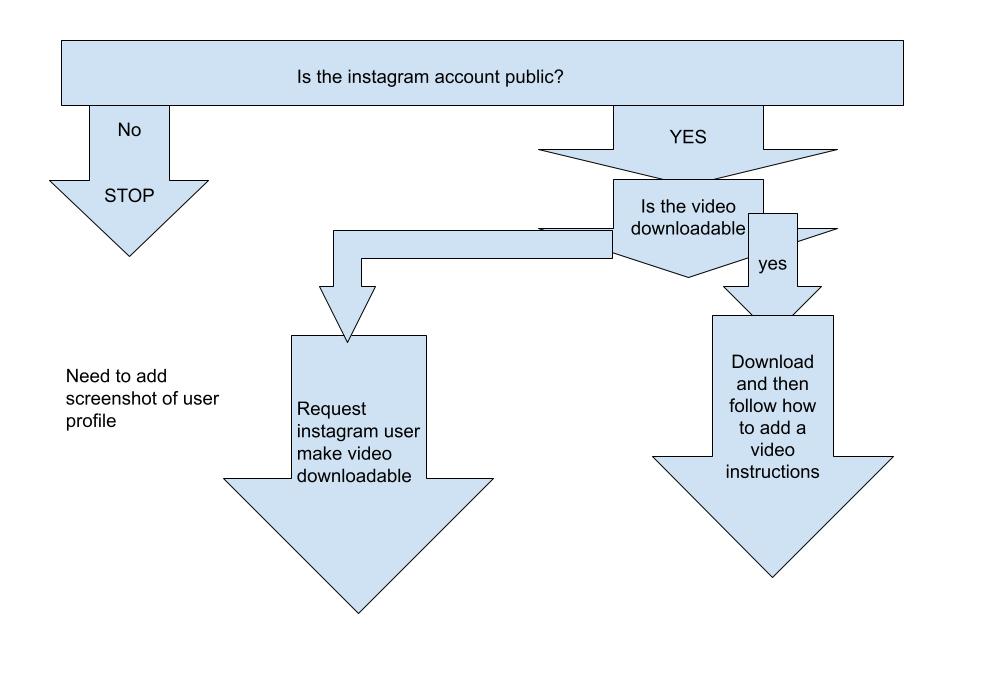
Flowchart to download a reel from another user’s Instagram account
Is that user’s account public? Yes, keeping going. No, stop
Has that user enabled downloading?
Yes – download and put into your AdoptMeApp YouTube account
No – does that user allowing contacting? Yes, keep going. No, stop
Yes – ask user to turn on downloading
INSTAGRAM TEXT
Who can see and share your reels on Instagram?
turning on the Instagram downloading setting does not mean every reel in the account becomes downloadable; it only allows others to download reels for which you have enabled downloads, and it does not affect reels uploaded before you turned the setting on, or reels from private accounts, which cannot be downloaded. Creators can manage this setting on a per-reel basis or for their entire account, and it only applies to public accounts.
Here’s why it’s not automatic for all reels:
- Creator Choice: You control whether your reels can be downloaded by enabling or disabling the feature in your account settings for specific reels or all reels.
Privacy Settings:
Reels from private accounts are not downloadable by default, regardless of the download setting.
Individual Reels:
Even for public accounts, you can disable downloads for individual reels after they have been posted.
Existing Content:
The download setting only affects reels uploaded after the setting is changed, and it doesn’t retroactively apply to old reels.
To manage your download settings:
- When uploading a reel, tap Next.
- Tap More options at the bottom of the screen.
- Find the option for Allow people to download your reels and toggle the switch to turn it on or off.
- You can select to enable or disable it for all reels or just the reel you are currently uploading.
- Who can see and share your reels follows your account’s privacy settings: For public accounts: Anyone on Instagram can see and share your reels – Instagram Help Center
Instagram Reels Download History
For older videos or content from private accounts, third-party apps and screen recording are still common methods for saving content.
Instagram enabled the native ability to download Reels from public accounts globally in November 2023. The feature was initially released to users in the United States in June 2023.
Key details about the feature
- Public Accounts Only: You can only download Reels from public accounts.
- Opt-out Option: Creators with public accounts can disable the download option for their Reels in their account settings.
- Watermark: Any Reel downloaded using this method will be watermarked with the Instagram logo and the creator’s username.
- Audio Limitation: Reels that use a licensed audio track will be downloaded without sound.